Getting connected

At the end of part 1 of this story, AS197754 was up and running with IPv6 single-stack and two upstreams (Cedric & Nick). Next step: getting connected.
Transit
Actually, for that, let's rewind a little. The internet is made up of different networks (called 'autonomous systems', abbreviated with 'AS') that interconnect (peer). In part 1, I started with connecting the network internally with tunnels, OSPF and iBGP. This makes sure that whenever a message enters the network, it is actually successfully forwarded to the correct place within the AS. For the outside world, AS197754 is a single cohesive, connected, unit.
Finally, at the end, two of the routers (called 'border routers') were connected to 'upstreams' or 'transit providers'. Transit providers have a relatively simple task: they connect you to the whole internet (everyone else).
In that sense, it is comparable with your home internet: you don't specifically use different home internet providers for different internets, you just get one to connect to everything. There is a difference however: you can - and should - have multiple transit providers, and you can prefer using certain providers for certain routes.
Sometimes you will have to pay for transit, sometimes you can get it because you are a member (for instance with Netwerkvereniging ColoClue) and sometimes (for personal networks) you may be able to trade something for access or get it for free. Especially if you need to pay for certain connections (at certain bandwidth limits), you may want to intelligently steer traffic to one of the providers, using another transit provider as a backup.1
Additionally, your router will also prefer shorter paths by default, so this also determines which of your transit providers will be selected for a certain route, based on their connections.
Route64
One transit provider I want to highlight, and one that helped me test my setup, is Route64 (Johannes Ernst, AS212895). Route64 has some pretty good direct upstreams2 and the transit service is available via tunnel as well as over internet exchanges.
While I would not recommend using a transit provider through a tunnel long-term if you have alternatives, it was easy to connect to their network using a SIT tunnel (mostly known as the tunnel type used by Hurricane Electric for their IPv6 tunnel broker service). First, you create an account on the management portal for Route64, then choose an endpoint close to you and then add the interface in your router. You can also choose another tunneling protocol if you prefer (or have restrictions in your router software), but it does make most sense to stick to GRE, SIT, Wireguard or VXLAN. Note that encryption does not help much here: all your transit traffic should be assumed to be on 'the public internet' anyway.
Note
When selecting a tunnel endpoint, ping/traceroute each of them from the router you wish to connect from to see what route the packets take. You want a route with minimal providers in between (not necessarily the lowest ping), so: where the path is as directly peered as possible.
Long term, I have decided not to use Route64 as an upstream in my network specifically because they have so many different upstreams themselves and I have no clue how they are connected physically and with which agreements.
For my other transit providers, I have a good idea on what their network looks like physically and what their policies are, but because Route64 has so many short and different routes to different tier 1s, my route propagation graph (the one you see on bgp.tools) was very diverse. In that sense, more is not always better. I find that it is often better to have solid commitments and connections with fewer transit providers that have policies (for instance on redundancy or filtering) that you agree with.
Nevertheless, Route64 can help you out if you cannot do BGP from home or if you need a second upstream on a VPS to try things out and connections through them worked well.
Other recommendations
If you need a tunnelled provider, you could also look at FreeTransit (AS41051) and BGPTunnel.com (AS209533). Both are operated by reputable parties, Openfactory and iFog respectively. I have used neither, so I cannot comment on the quality or ease of setup. Note that neither provider allows downstream networks.
If you need a Dutch VPS with transit, you can look at Greybull, as mentioned in the previous part. I have also seen people use Vultr, who also have a BYOIP policy. Note that Vultr specifically uses a distributed network architecture: every datacenter has different upstreams. For that reason, it is a bit more complex. I have not used Vultr's BYOIP system myself.
If you are a ColoClue member, you can get transit through ColoClue directly, either on your physical machine or on your VPS at Hostingvereniging Soleus. You can also get a second transit connection from some of the members (including for instance AS212635 and NetOne-NL/AS200132). Especially NetOne has some excellent upstream providers, such as Asimo, Fusix and Worldstream. If you need any help finding transit at ColoClue, feel free to contact me.
Bonus: Traffic Steering & Prepending
Before we continue, a quick bonus subject: traffic steering. As we have seen before, you might want to steer traffic to one of your providers to influence which path the packets take. Besides good upstream selection, as discussed above, you can also influence the path in two other ways:
For incoming traffic, you can 'prepend'. When you announce your routes to your upstreams, it normally includes your AS number once, such as in the path 8283 197754 (I directly connect to ColoClue here). If I want to disincentivize other networks to take this route, I could also add my number multiple times, thus making the path longer. Thus, 8283 197754 197754 197754, with 2x prepending, is also a valid path that I can announce.
Most upstreams will keep your prepends, but some may ignore it (or remove them). It is also up to the sending network to honor those prepends in route selection. While most networks will select the shortest path, tier 1s (the big networks at the top) often ignore them and choose their own paid customers instead to maximize revenue.
So, for instance, Orange (French ISP and tier 1, AS5511) sends traffic destined to my network through Worldstream (AS49981) (49981 200132 210320 197754 197754), while a direct route also exists through Fusix Networks (57866 8283 197754).3 In this case, both Worldstream and Fusix are local, so the routes ping times and bandwidth are about equivalent.
For outgoing traffic, you can add a bgp_local_pref attribute when receiving the route from your upstream. This value is used first when determining which route to select: highest value wins. Only when the local pref is the same as the other route, the path length is evaluated.4
Internet Exchanges
Transit is not the only way to get connected.
Preferably, traffic on the internet stays local. So, when you are both located in the same datacenter or very close physically (for instance within the same city), why would you send your traffic up to your transit provider, have your transit provider send it to the transit provider of your peer and then back down, if you can also just connect with each other?
This idea is what internet exchanges (or internet exchange points/IXPs) are based on. Effectively (and sometimes literally), IXPs are just big switches that everyone connects to, such that we don't need a wire to everyone individually.
Effectively, we don't want every datacenter rack with networks to look like this:
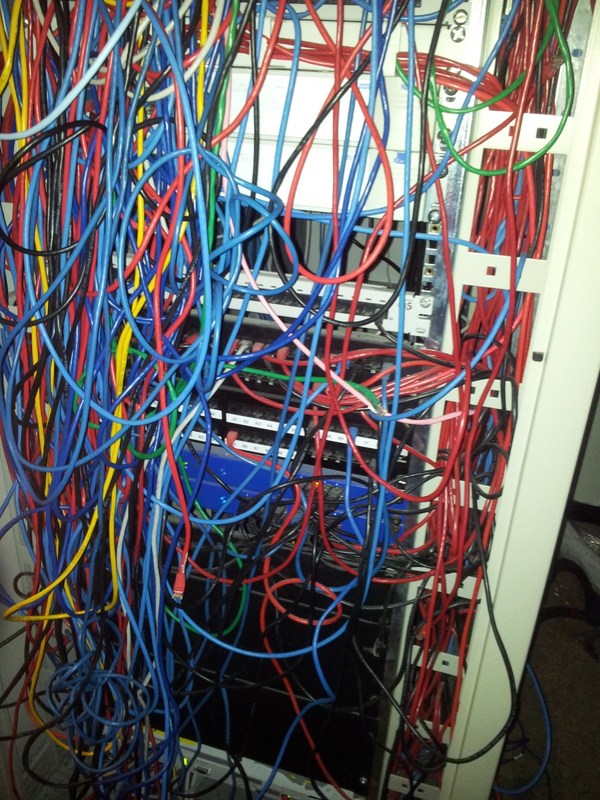
There are two types of internet exchanges:
Virtual IX
Let's start with the controversial5 one first: the virtual internet exchange. Virtual exchanges are exchanges were there majority of the participants connect through a tunnel, just like the Route64 transit from before. They can be very useful for learners/personal networks: you do not need any physical connections to join a virtual exchange. For virtual exchanges, the same recommendation applies as for tunneled transit: make sure to check the route to the exchange tunnel endpoint. You should pick a tunnel endpoint that has the most solid connection to your router, combining attributes such as latency (ping time), bandwidth available and peering agreements on the path to make a decision.
The first IX I joined with AS197754 was such BGP.exchange Amsterdam (now re-branded to ixFabric Amsterdam), which I joined through a VXLAN tunnel. The Amsterdam endpoint for ixFabric is located in AS34927 (iFog GmbH) and physically in Amsterdam and thus I get ping times less than 1ms to other members on that exchange. The BGP AS path is also pretty solid as my upstream ColoClue (AS8283) and iFog are direct peers.
Warning
Actually, while writing this, the ping is 30-50ms and the path goes through NL-IX and Liberty Global. I think this perfectly shows the risk of a virtual IX. When I originally set-up the AS, the ping times were low and this path was pretty optimal, but over time the path has shifted. This is likely temporary and will shift back later, but with a tunneled connection (either transit or virtual IX) you can never be sure of the exact connection with peers on that exchange.
So my connection with AS215248 through ixFabric Amsterdam currently measures at ~40ms of latency, while a connection to the same AS over Frys-IX is about 0.8ms.
In my opinion, virtual exchanges are a great learning tool and much preferred over the alternative of creating direct tunnels to peers that you cannot connect directly with (such as other BGP learners). If you have no other options, try to pick a virtual exchange in a good interconnected location, based on your upstreams peering paths. Amsterdam may be a good choice for much of Europe. Then, only peer with networks that you cannot connect to on any other exchange and have poor transit paths to.
This is also the reason for the AS197754 peering policy to not peer with route servers at virtual exchanges. I want to keep control over which connections may use such a tunnel.
Physical IX
The second type of exchange is the more common one: a physical exchange. Physical exchanges, as noted before, consist of one or more interconnected physical switches. You can connect directly to such as switch (with a datacenter interconnect), through remote peering5, or through a reseller. Don't expect connecting to physical exchanges to be easy or cheap: often it requires finding a path towards that switch from your router and you may need to spend quite some money to do so. I will tell you more about getting connected to physical exchanges in upcoming parts of this series on the set-up of AS197754.
Tip
In October 2026, I helped initiate the Clue Internet Exchange (Clue-IX).
Clue-IX aims to provide an accessible physical exchange for ColoClue members. To connect, first become a member of ColoClue, place a machine (or use a Soleus VPS) and then request access. You will get a VLAN assigned to your port/VPS and as well an IP address to use.
Clue-IX is meant as a place for learning. There is no separate quarantine LAN and you will not be banned for bad traffic, but we do expect you to fix your configuration upon being notified.
Joining your first IX
Internet exchanges also have rules, which you will have to understand before you join. If you don't, your port/connection might be disabled. For all the details, I would like to refer to this excellent writeup from Quantum5.ca: 'Joining your first Internet Exchange'. That post helped me a lot with creating my configuration.
I use systemd-networkd to setup the exchange interfaces. To make sure that I only send allowed traffic (IPv4 unicast, IPv6 unicast, ARP and NDP), I use the following configuration:
[Match]
Name={{ interface_name }}

[Link]
# Exchanges generally use 1500 MTU
MTUBytes=1500

# Disable multicast for exchanges
Multicast=no
AllMulticast=no

[Network]
# Add your IPv6 address here
Address={{ address }}
# You may add a second Address= line for IPv4 if you were assigned IPv4

# We don't want any default routes here
DefaultRouteOnDevice=no

# Do not accept or send router advertisements
IPv6AcceptRA=no
IPv6SendRA=no

# Do not accept DHCP
DHCP=no

# Make sure LLMNR and mDNS are disabled
LLMNR=no
MulticastDNS=no
LLDP=no

# Disable proxy NDP & proxy ARP
IPv6ProxyNDP=no
IPv4ProxyARP=no

# Reduce DAD
IPv6DuplicateAddressDetection=1
Also make sure to configure the following sysctl rules properly, as these cannot be specified in systemd-networkd:
net.ipv4.conf.all.arp_filternet.ipv4.conf.all.arp_ignorenet.ipv4.conf.all.arp_announce
Tip
If you use systemd-networkd in combination with Bird, you might also benefit from this config snippet for /etc/systemd/networkd.conf:
[Network]
ManageForeignRoutingPolicyRules=no
ManageForeignRoutes=no
ManageForeignNextHops=no
This makes sure that systemd-networkd does not try to manage the full table routes that you import from Bird. If you do not configure this, restarting systemd-networkd will often timeout with Could not enumerate links: Connection timed out.
Make sure you stay compliant
To make sure you keep to the rules and don't send invalid traffic, you can use ix.watch. For instance, for Clue-IX, you can see all 'offending networks' here: https://ix.watch/ix/clue-ix. Clue-IX is pretty forgiving on bad packets, so you can test your network with other private networks. You can also subscribe to alerts for your AS for free at ix.watch by logging in with your PeeringDB account.
Next time
Next time, in part 3, I will tell the story of migrating from my VPS to a physical machine, deploying RPKI with Routinator 3000 (and thus filling up my precious RAM) and actually getting my first physical IX connections.
If you want to receive part 3 automatically, make sure to subscribe to the RSS feed.
Footnotes
-
Note that paying for transit often gets you better connections: transit providers have upstreams themselves too and those upstreams may charge them as well. So, if they have more money available, they can get more direct connections, more bandwidth or better service. ↩
-
Including direct transit from tier 1s such as Arelion and Hurricane Electric and big tier 2s such as Paradox Networks, Inter.link GmbH, InterKVM, Eranium B.V., iFog and Macarne. ↩
-
You can find which routes the providers have through their Looking Glass tool. So for Orange, this would be visible at https://looking-glass.opentransit.net/. ↩
-
This also exactly what the Tier 1s actually do, they 'local pref' their own customers higher. ↩
-
There is some controversy around the term 'virtual exchange'. While some exchanges, such as EVIX, explicitly call themselves a 'virtual exchange', while others avoid the term entirely. While I am perfectly okay with them (for learning), some think that IXPs should be inherently physical and that tunneled connections in networks (often of any kind) make the internet less stable and break the social contract (you don't know if another network actually uses tunneling over another net instead of actual fibers). Related issues also exist with remote peering (where an exchange connects a switch physically far away), which may cause two US peers to have their traffic go through Amsterdam. Use tunneled/virtual exchanges & remote peering responsibly! ↩ ↩2