BGP: how hard can it be?

This post details the events that occurred from the origin of AS197754 in May 2026 up to fully working IPv6 only announcements at the end of that month. Consider it a part 1.
If you listen to the Fusix Podcast, you will know one catch phrase that one of the hosts, Niels Raaijer of NLNOG fame, will repeat at least once every episode:
dat moeilijke BGP
Right after, Niels will then always repeat that BGP is not actually that hard, sometimes being countered by another person that they aren't so sure yet.1 After setting up my own system, I can tell you that Niels is absolutely right: BGP is not that hard.
It's just that.. ehm... everything else around it kinda is (especially if you are a newbie).
The origin of AS197754
This story begins quite a while ago. I have always been interested in the internet, even from a very young age. While I had no actual network, IPs or fibers, we would always use 'my ISP' at home, as I configured the network routers and the wifi.
Over time I acquired some servers, both physical and virtual (VPS), hosted some services, but never actually owned any IPs. While I had my own network, it was always dependent on someone else. Quite often I had to make weird workarounds to save myself from paying for extra IPv4 addresses or to work around issues with the IPv6 implementation of my upstream providers.
Sometime last year, I happened upon the Fusix Podcast and heard about all these wonderful people that created their own networks2. Some of them got some IP addresses years and years ago (pre-2010), when the IPv4 pool was not yet empty. Some started more recently, possibly with an IPv6-only network. It didn't quite seem like I could do that too, but I did come to understand what I would need to join the club through the podcast.
I also happened to find the ColoClue association (possibly even a few years ago) and after I heard more about it on the podcast (as well as on MNOT), I decided to join. The summer BBQ of 2025 and the ColoClue Presents in nov 2025 marked my first events and before long I was a full known member of the ColoClue IRC chat.
A strange question
It did not take that long for a rather mysterious message to turn up in the chat:
nullr0ute: goenavund, ik zoek een slachtoffer..
nullr0ute: met eigen ASN, en iemand die een gratis VPS wil :)
Let's say that this is where entire adventure started. I was going to be that victim. I did not have an AS, but upon contacting this mysterious IRC user, I learned that it didn't matter. I would request one, just for this special assignment.
After some emails and completing the ritual to join the secret pact of ColoClue members, two requests were sent to RIPE NCC: an ASN and a /48 IPv6 PI block. Luckily, the volunteers at ColoClue make it quite easy (thanks Jelle!), if you follow their requests and emails exactly.
Finally, a few weeks after the IRC message, on the 7th of May, both were assigned. I then quickly created that free VPS and some Ansible playbooks. It just happened that around that time apalrd's adventures made a post detailing his ASN/BGP experiment. Having this resource available helped me a lot in constructing the first version of the playbooks. After another week, my new IPv6 PI prefix was being announced and visible on the internet, sort of.
Bliss
At the start, I worked with three VM's: one at nullr0ute (who turned out to be this Nick fellow from the podcast), one from another very helpful ColoClue member Cedric, and one at home. My Ansible script would automatically create a mesh of ip6ip6 tunnels between all of those3, install BIRD 3 and then create an OSPF area on top. Pretty quickly after I could ping the loopback addresses I had assigned to each VM (from my IPv6 PI space) over this mesh.

Okay, no BGP yet, just OSPF. Everything works great. Let's add iBGP between those routers.
Tip
I am going to skip over it here, but I also configured OSPF to use authentication using hmac sha512 (note that the ip6ip6 tunnels do not provide encryption) and I created a Wireguard mesh for iBGP. My nodes specifically could not use TCP-AO (RFC 5925) due to it not being compiled into the standard Debian kernel, but that might be an alternative for you as well. Just make sure to secure the OSPF and iBGP traffic within your AS!
I made sure to configure iBGP with a full mesh (between the loopbacks that OSPF so helpfully connects). If you would have a bigger AS, this would not scale great and you should employ a route reflector instead. However, for n=3 or n=4 routers, this will work fine.
Something that surprised me when I first set it up (and that may surprise you too) is that iBGP is not a setting you set on the specific session. BIRD determines that a session is iBGP both based on the AS numbers involved (which would be your own on both sides) as well as based on the direct or multihop settings.
Note
eBGP sessions are generally direct (with the exception of sending routes to a route collector, such as the one for bgp.tools or bgp.he.net). This follows from the fact that you would have no reliable way to reach the other AS if there wasn't a direct link. If BIRD would allow you to do full eBGP peering by routing packets with the existing kernel routing table, you could get loops or the packet could get lost entirely. To get stable, working sessions, you therefore always need a direct connection (best case an actual layer 2 link, but a layer 3 tunnel does work) with your peering partner.
I had a great time. OSPF worked, iBGP worked, even BFD worked to make sure that my connections would quickly disconnect if a tunnel failed. Everything worked great for me!
Until I actually started peering.
Lessons learned (BGP in practice)
On the 17th of May, I actually started announcing my new piece of the internet: 2001:678:1278::/48. Cedric informed me that he actually did not have any downstreams yet, so we were going to be learning together. For Nick, this was the first time someone used BGP transit in his new VPS system.
Let's just say that we found some things and we had a great time figuring everything out.
Tip
If you are setting up an AS, I highly recommend starting with two upstream providers on two separate hosts as I did. This gives you maximal flexibility in temporarily disabling a specific upstream to see what impact this has on your prefix propagation. It also makes sure that you can work on one host at a time to try new things. You can just use two VPSes for this.
1. AS-sets
Figuring out how to setup BIRD to get everything done was easy, especially with the existing resources on the internet. I added my prefix to the export filter and it got announced to Cedric and Nick. They could see my prefix being announced. Job done!
However, it just didn't spread. Initially, only AS37739 (Abantu) -> AS6461 (Zayo) picked up my route from Nick and none of the transit providers connected to Cedric did.
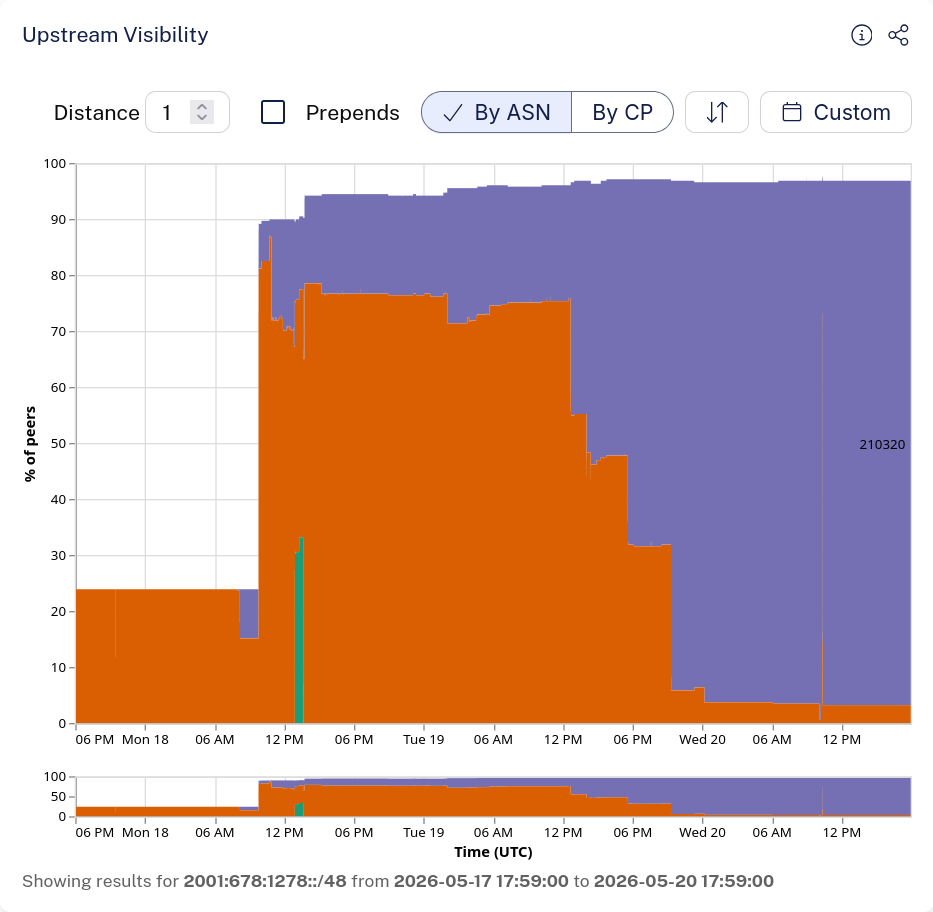
This rocky start can also be seen in the RIPEstat data. RIPEstat and the realtime graph for your prefix on bgp.tools can be really helpful in figuring out the state of your prefix. You can also use RIPE Atlas measurements, but you will need someone to give you some credits first.
On the 18th of May, only ~25% of the internet could reach my prefix through Zayo. After Fusix accepted my prefix this rose to about 90% and other tier 1s also accepted the route. But still, none of the transit providers connected to Cedric would relay my prefix.
The culprit and lesson 1 for this post, was the humble AS-set4. An AS-set is a resource, registered in an IRR database, such as the one at RIPE NCC, that consists of a list of AS numbers. Here's an example: RIPE::AS197754:AS-CHRGNL. This one is very simple, it just lists my AS and any downstreams I have (at the time of writing: none).
Every network will make decisions on which routes to accept from their peers. There are different techniques to do this, such as looking at the RIPE (or other RIR) database, which we refer to as IRR filtering, or looking at if there is a valid RPKI ROA for your prefix and AS combination. Techniques like this provide information about the ownership of a route and decrease the chance of rogue invalid announcements. The databases for these lookups are refreshed on a regular schedule (different for each network).
Another technique to prevent rogue announcements is looking at an AS-set defined by your customer, before you relay the information. If your customer announces a route to you ending in an AS that is not in their defined AS-set, you should probably reject that route, as they may be accidentally sending that route to you (misconfiguration) or there may be some evil intentions.
Therefore, make sure that your upstreams actually include your AS into their AS-set before you start announcing your route. After Cedric added my AS to an AS-set and notified all upstreams of his new set, the route started to propagate properly.
So, lesson 1, what did we learn?
- Propagation spread on the internet for your new prefix will take a while.
- Providers use different methods to determine if they should relay that prefix, such as RPKI ROA validation and IRR checking and/or checking if your AS is in the AS-set of your upstream.
- Providers refresh their IRR and RPKI information on a regular schedule, such as every few hours. This means that updates are not instantaneous.
- Some providers (even tier 1s) may not actually spread your prefix to the entire internet (DFZ), so getting your routes accepted by Zayo does not mean that all other tier 1s will automatically use it too.
- Make sure that your upstreams actually include your AS into their AS-sets before you start announcing your route.
2. Proxmox firewalling
Eventually, almost the entire internet accepted my route and I could start testing. I could send traffic out and through Cedric's network I could also get traffic in. Great!
At Nick's end, I had no such luck. Whenever I would send traffic, I would not get the replies. This happened especially if I would send traffic out of my interface with Cedric and receive it back through the interface with Nick. Veterans may be screaming already: REVERSE PATH FORWARDING!
That wasn't actually the issue, I will tell you more about that in the next section. The main issue here was that I was using a Proxmox VM with firewalling on. Or, more specifically, the Proxmox firewall on this VM was off, but the Proxmox host level firewall was on.
Lesson 2: if you are using Proxmox and have the hypervisor level firewall on, make sure to disable connection tracking on the host firewall. If you don't, packets that did not originally exit through the hypervisor will be rejected. Disabling this setting will also save you some CPU power.
Sadly there is no UI toggle for this, you will need to edit the /etc/pve/nodes/<nodename>/host.fw file on your hypervisor host to contain this line:
nf_conntrack_allow_invalid: 1If you are using VM firewalling, you should also disable the IP Filter in the Firewall options for the VM or set the IPSet according to the IP addresses you want to announce. I did not test this, as I either used dedicated PCIe network cards or disabled the VM firewall in Proxmox.
3. Reverse path forwarding (doesn't exist?)
Ok, lets get to the reverse path forwarding (RPF). I was using an IPv6-only setup to get the AS up and running. In IPv6, RPF is implemented in your firewall rules itself. If your firewall is off (no iptables or nftables rules), there is also no reverse path forwarding. No need to search for any Linux sysctl flags, they don't exist.5
If you are using IPv4 as well, this is something you may get stuck on. It is so common, you can even see it in the rules of dn42:
The first rule of dn42: Always disable
rp_filter.The second rule of dn42: Always disable
rp_filter.The third rule of dn42: Allow ip forwarding!
No seriously, in case some packets are dropped, first check if your settings are correct.
RPF makes sure that packets actually use a route that also exists in reverse, such that computers on a network cannot just spoof any random IP address. You should really implement this on your access network (behind the AS) or if you have any customers, but for internet routing this is not ideal. Routes spread by BGP naturally take asymmetric paths. Therefore, within your core AS network, you will need to disable RPF.
The howto page for dn42 explains how to disable RPF for IPv4: https://dn42.cc/wiki/howto/network-settings/ (as well as some other common issues, including conntrack from lesson 2).
4. Explicit route source IPs
The Linux networking stack is pretty smart! Your system will automatically figure out which address to use for outgoing connections or replies. We are putting the system into a strange situation however, as all our external interfaces have external IPs from upstream providers and the actual IP we want to use on outgoing connections (the one from our own prefix) is only a loopback address. For most connections in this scenario, Linux will prefer the address on the outgoing interface over our loopback.
Replies to those connections will then also just travel back to that address, ignoring any nice anycast routing and traffic engineering we have done for our own prefix. We would of course prefer to use our own IPs when initiating outbound connections (except for the ip6ip6 tunnels).
To get this done, you can use the krt_prefsrc attribute in your filters within BIRD. If you receive a route from your upstream provider (such as the default route or the full table), you can set this attribute to your desired outbound IP (loopback) and the kernel will prefer that given IP when connecting to any IP in the route prefix.
If you are just using link locals to connect to all peers and never specifying any global addresses anywhere except on loopback, you will not need it, but for everyone else, this is lesson 4.
5. Locking yourself out
Oh, and lesson 5 follows immediately: don't forget to add some static routes to your other nodes and the computer you are connecting from to manage these VMs! If you remove the default gateway and just rely on BIRD to get routes, the kernel routing table will be fully empty whenever BIRD resets or is misconfigured. That means that there also will be no connections to the other nodes (ip6ip6 tunnels will not come up) and you cannot access the VM by SSH.
To prevent this, always add some static routes (you can do this with a static protocol in BIRD) set to the upstream default gateway (any interface is fine) to make sure those exist even if you misconfigure BGP.
Bonus lesson: Proxmox Virtio Network Interfaces
We also had some issues with packet loss on the virtio interfaces in Proxmox. It seems that it generally works fine but if you send many large packets the virtio stack sometimes cannot quite keep up. This might have been due to the specific setup and this is not a scientific investigation, so I wanted to include it as a bonus lesson.
You will see this in reduced speed in iperf3 with a high retransmission count. If you have more CPU cores, setting the multiqueue option on the network interface in the advanced section to a higher core count may help.
If you have a lot of traffic, consider buying a proper enterprise network card (such as the Intel I350) and using PCIe passthrough. When using a PCIe passthrough card, you can also use the host and VM firewall normally for internal traffic without setting the extra parameters.
Next time
After learning all of this, I had a fully working IPv6 prefix announced on the internet as AS197754. I could ping it from any NLNOG ring node and RIPE Atlas node and RIPEstat showed a 100% visibility. Phase 1 was done, I was connected to the internet at two sites with two transit providers connected. I could also use my third node at home with the public IPs perfectly, even though it was only connected to the other two by tunnel.
Next time, in part 2, we will continue the adventure with my first external connection (Route64), first IXP (bgp.exchange), a physical machine to replace the VM in Amsterdam and some gripes with deploying RPKI validation.
If you want to see that post automatically, make sure to subscribe to the RSS feed.
Finally, I would like to thank Cedric (AS210320) and Nick (AS202585) for their support in setting up AS197754. You can read about the current state of AS197754 here.
Tip
If you would like to start announcing your own prefix, I recommend you take a look at a VPS from Greybull. Nick has made sure that all issues above are fixed and BGP is very easy to use within the Greybull dashboard. His filtering is also very robust and MANRS compliant, so you can safely experiment. Just make sure to create a PeeringDB account and add ROAs for every prefix. You can then automatically enable them within the portal and view your sessions with his BGP servers.
Footnotes
-
If you speak Dutch, the Fusix Podcast is a real gem and easy to recommend to anyone with an interest in networking, BGP or the inner workings of the internet. ↩
-
I recommend the episodes with Peter-Paul and Nick if you want to get some inspiration for your own AS. ↩
-
This setup is really similar to the one from the apalrd blog post. Every tunnel sets link local addreses on each end with the router ID. So, for instance, router 1 would have tunnels to both router 2 and 3 and on each link get the IP
fe80::1. BIRD would then run OSPF over all these interfaces, determine the best way to get to each loopback address and write this into the Linux kernel routing table. After all this setup, you have a public loopback address from your own block on each router and have reachablity to every other loopback address with minimal MTU loss. ↩ -
Not to be confused with the BGP concept of AS sets which is deprecated but will come up if you search for it. ↩
-
The concept of Unicast Reverse Path Forwarding (uRPF) does thus exist in IPv6, it is just implemented in the firewall in Linux, instead of in the kernel IP stack itself. ↩